Open topic with navigation
External Lookup Tables
Provide the path of the external file where the contents of the lookup table is stored.
Click on Options button to open External Options Dialog:
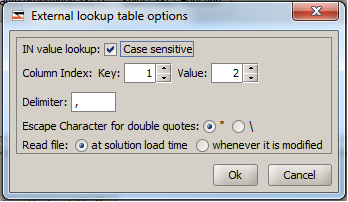
- If the input values are case sensitive, check IN value lookup is case sensitive.
- If the format of the lookup table stored in external file is such that values are in column 5 and keys in column 10, then specify the corresponding Key Column Index as 10 and Value Column Index as 5.
- Specify a delimiter that will be used to separate fields on a line.
- Specify the escape character to be used for escaping double quotes in the text.
- If the Read file option is set at solution load time, the lookup table values are read only at solution load time, and never again afterwards. If it is set to be read whenever it is modified, then the file will be read at load time and also whenever it is modified.